
Discover how professionals can use ChatGPT in 2026 for email writing, report making, and work automation to boost productivity and save time at the office.
Table of Contents
Introduction: Why ChatGPT Is a Must-Have Tool for Professionals
The professional workplace in 2026 is faster, more digital, and increasingly AI-assisted. Professionals are expected to manage emails, reports, meetings, research, deadlines, presentations, and daily tasks while maintaining quality and productivity.
This is where ChatGPT can become a practical workplace assistant.
Learning how professionals can use ChatGPT in 2026 can help reduce repetitive work, improve communication, organize information, and speed up everyday tasks. Instead of replacing professional judgment, ChatGPT can support employees, freelancers, managers, marketers, business owners, and other professionals by helping them work more efficiently.
From drafting professional emails and summarizing meeting notes to structuring reports, brainstorming ideas, analyzing information, and creating task plans, ChatGPT can support many parts of a modern workflow.
However, effective workplace AI use requires more than simply generating content. Professionals should provide clear instructions, review AI-generated output, protect confidential information, and follow their organization’s AI and data-use policies.
In this guide, we’ll explore practical ways professionals can use ChatGPT in 2026 for:
- Writing and improving professional emails
- Creating and structuring reports
- Summarizing meetings and documents
- Organizing tasks and priorities
- Brainstorming ideas and solutions
- Improving presentations and business communication
- Creating first drafts and templates
- Supporting research and analysis
- Automating repetitive workflow steps
- Improving everyday productivity with AI
Whether you work in marketing, sales, finance, education, technology, administration, or run your own business, learning to use ChatGPT effectively can help you spend less time on repetitive tasks and more time on work that requires human judgment and expertise.
What Is ChatGPT and Why Professionals Should Use It
ChatGPT is an AI-powered conversational assistant that knows commands and generates human-like responses.
For specialists, ChatGPT works like:
- A smart writing assistant
- A productivity booster
- A record drafting helper
- A task automation guide
The actual energy lies in understanding how professionals can use ChatGPT in 2026 effectively — now not blindly, but strategically.
How Professionals Can Use ChatGPT in 2026 for Email Writing

Why Email Writing Matters in Office Work
Emails are a each day responsibility for experts. Poorly written emails can:
- Create confusion
- Waste time
- Look unprofessional
ChatGPT allows professionals write clean, well mannered, and effective emails speedy.
Types of Emails ChatGPT Can Help With
Professionals can use ChatGPT to write:
- Formal business emails
- Client verbal exchange emails
- Follow-up emails
- Meeting requests
- Apology or clarification emails
This is one of the most realistic examples of how professionals can use ChatGPT in 2026.
Example Email Prompt
“Write a expert follow-up email to a consumer concerning a behind schedule task replace.”
ChatGPT generates a easy draft that you could customize before sending.
Best Practice for Email Writing
- Review before sending
- Adjust tone to agency way of life
- Never ship AI text blindly
ChatGPT saves time, but human judgment remains critical.
How Professionals Can Use ChatGPT in 2026 for Report Making
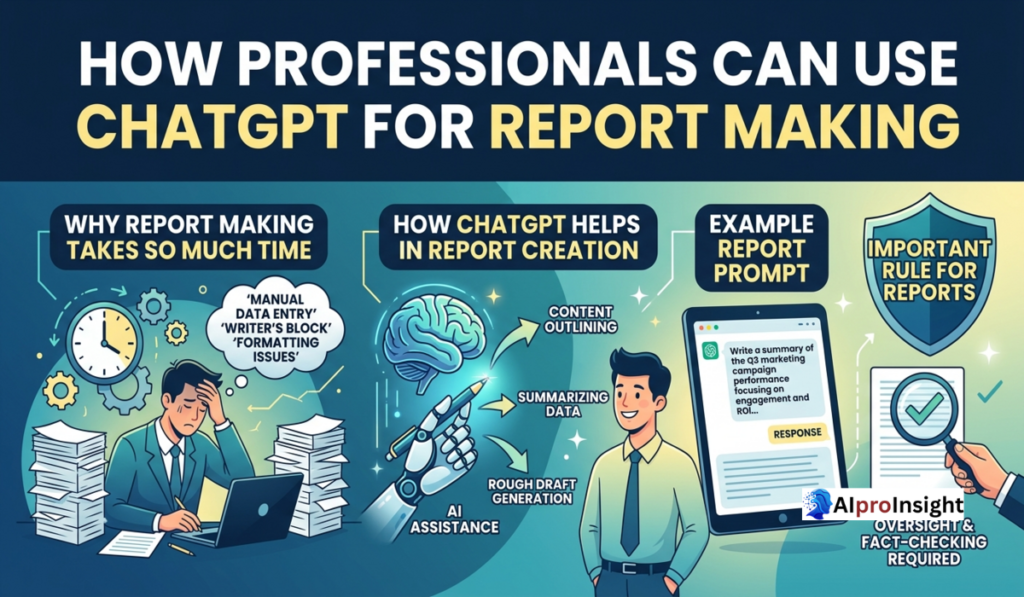
Why Report Making Takes So Much Time
Reports often involve:
- Structuring records
- Writing summaries
- Explaining facts
- Maintaining a expert tone
ChatGPT allows simplify and accelerate this procedure.
How ChatGPT Helps in Report Creation
Professionals can use ChatGPT to:
- Create record outlines
- Draft executive summaries
- Rewrite complex content material surely
- Improve grammar and glide
This is a powerful way how professionals can use ChatGPT in 2026 without compromising exceptional.
Example Report Prompt
“Create an outline for a month-to-month performance report for senior management.”
ChatGPT offers a dependent format that saves hours of planning.
Important Rule for Reports
ChatGPT have to assist, now not update professional know-how.
Data accuracy and very last approval should constantly be human-led.
How Professionals Can Use ChatGPT in 2026 for Work Automation

What Is Work Automation?
Work automation approach lowering repetitive responsibilities so experts can focus on high-fee work.
ChatGPT enables automate:
- Repetitive writing duties
- Standard responses
- Task planning
- Documentation drafts
This is wherein how professionals can use ChatGPT in 2026 will become clearly effective.
Daily Office Tasks ChatGPT Can Automate
- Writing general e-mail replies
- Creating assembly agendas
- Drafting SOPs
- Preparing challenge checklists
- Creating productivity plans
Example Automation Prompt
“Create a every day project checklist for a project manager handling more than one customers.”
ChatGPT produces a clean, organized task listing instantly.
Boosting Productivity with ChatGPT
Why Productivity Matters in 2026
In 2026, productivity is measured with the aid of:
- Output high-quality
- Speed
- Consistency
ChatGPT helps specialists:
- Reduce mental load
- Save time
- Stay organized
This is every other key motive how professionals can use ChatGPT in 2026 correctly.
Productivity Use Cases
Professionals can use ChatGPT to:
- Plan every day schedules
- Break large obligations into steps
- Prioritize work
- Reduce procrastination
Using ChatGPT for Meetings & Communication
ChatGPT can assist with:
- Writing meeting agendas
- Creating assembly summaries
- Drafting comply with-up notes
Example Prompt:
“Summarize meeting factors and create action gadgets.”
This facilitates experts stay clean and organized.
Ethical and Responsible Use of ChatGPT at Work
Using ChatGPT responsibly is vital in expert environments.
Do’s
- Use it as a aid tool
- Verify statistics
- Add expert judgment
Don’ts
- Don’t share confidential information
- Don’t post AI drafts without overview
- Don’t depend blindly on AI
Ethical usage defines how professionals can use ChatGPT in 2026 effectively.
Avoiding Over-Dependence on ChatGPT
ChatGPT is a device, not a alternative for skills.
Best approach:
- Think first
- Use ChatGPT for assist
- Edit and finalize your self
This balance guarantees long-term professional increase.
Benefits of Using ChatGPT for Office Work
- Saves time
- Improves verbal exchange
- Reduces pressure
- Enhances productivity
- Supports higher decision-making
When used effectively, ChatGPT turns into a profession accelerator.
Future of Professionals Using ChatGPT
Professionals who analyze AI tools early:
- Stay applicable
- Work smarter
- Grow faster in their careers
Understanding how professionals can use ChatGPT in 2026 is a future-proof ability.
Final Thoughts: ChatGPT as a Smart Office Assistant
ChatGPT isn’t always about replacing jobs. It’s about upgrading the manner specialists work.
When used responsibly, ChatGPT allows experts communicate better, paintings quicker, and stay productive in demanding office environments.
Mastering how professionals can use ChatGPT in 2026 offers you a clear aspect in the cutting-edge workplace.
👉 Day 6 will consciousness on How to Write Blogs Using ChatGPT in 2026 (Complete Workflow)
FAQs: How Professionals Can Use ChatGPT
1. How can professionals use ChatGPT in 2026?
Professionals can use ChatGPT for emails, reports, summaries, brainstorming, research assistance, task planning, writing, and many repetitive workplace tasks.
2. Can ChatGPT write professional emails?
Yes. You can provide the purpose, audience, tone, and key information, and ChatGPT can create or improve a professional email.
3. Can ChatGPT create business reports?
Yes. ChatGPT can help structure reports, create first drafts, summarize information, and improve clarity. Important data should always be reviewed before final use.
4. Can ChatGPT summarize meeting notes?
Yes. If you provide meeting notes or a transcript, ChatGPT can help identify key points, decisions, action items, and follow-ups.
5. Can ChatGPT improve workplace productivity?
Yes. It can help reduce repetitive writing, organize information, create task lists, brainstorm solutions, and speed up common workflows.
6. Can ChatGPT replace professionals?
ChatGPT is best used as an assistant rather than a replacement for professional judgment. Humans should review important outputs and make final decisions.
7. Is it safe to enter confidential company information into ChatGPT?
Professionals should avoid sharing confidential, sensitive, or proprietary information unless their organization’s policies and the applicable AI service explicitly allow it.
8. Can ChatGPT automate workplace tasks?
ChatGPT can assist with many workflow tasks, and when connected to appropriate automation tools, some repetitive processes can be streamlined further.
9. Can ChatGPT make mistakes in professional work?
Yes. AI-generated content can contain factual, contextual, or calculation errors, so important business information should be checked before it is used.
10. What is the best way to use ChatGPT at work?
Give it clear context and specific instructions, use it for appropriate tasks, review the output carefully, and keep human judgment involved in important decisions.

Suraj Verma is the Founder of AiProInsight and an AI Automation Researcher specializing in Artificial Intelligence, AI Automation, n8n, SEO, and Digital Marketing. He has published 300+ practical articles covering AI tools, automation workflows, and productivity solutions.
6 thoughts on “How Professionals Can Use ChatGPT in 2026 for Emails, Reports & Productivity”