
Learn how to create ChatGPT account with this step-by-step tutorial. Covers sign-up, dashboard overview, settings, and beginner FAQs in simple English.
Table of Contents
Introduction: Why You Must Create a ChatGPT Account
Artificial Intelligence is no longer just a future technology—it has become a practical part of everyday life. From writing and research to coding, learning, content creation, business automation, and productivity, AI tools are helping people accomplish more in less time. Among these tools, ChatGPT has become one of the most widely used AI assistants for beginners and professionals alike.
If you’re starting your AI journey and want to learn how to create a ChatGPT account in 2026, the process is simple. You don’t need technical knowledge or previous AI experience. ChatGPT can be accessed through the web and supported mobile apps, and users can create an account to save conversations, manage their chat history, personalize their experience, and access available ChatGPT features.
Interestingly, ChatGPT can now be tried without creating an account in supported regions. However, logged-out conversations have limitations and aren’t saved to your account history. Creating an account allows you to save and manage your conversations and access additional account-based features.
In this How to Create a ChatGPT Account in 2026 guide, you’ll learn:
- How to access ChatGPT
- How to create a new ChatGPT account
- How to sign up using Google, Microsoft, Apple, or other available options
- What information you may need during registration
- Whether phone verification is required
- How to log in after creating your account
- What you can do with a free ChatGPT account
- How to keep your ChatGPT account secure
- Common sign-up problems and how to troubleshoot them
The current ChatGPT sign-up experience provides multiple authentication options, including Google, Microsoft, Apple, and other available login methods. Phone verification is not currently required for creating a new ChatGPT account, although phone verification requirements can differ for certain OpenAI API activities.
Whether you’re a student, blogger, freelancer, content creator, business owner, marketer, developer, or complete AI beginner, this guide will walk you through the process in simple language.
Let’s begin and learn exactly how to create a ChatGPT account in 2026.
What You Need Before Creating a ChatGPT Account
Before we begin How to Create ChatGPT Account in 2026 (Step-via-Step Tutorial), make sure you’ve got:
- A operating email ID (Gmail encouraged)
- A mobile number(for verification)
- Internet connection
- Laptop or phone
That’s it. No technical competencies required.
How to Create ChatGPT Account (Step-by-Step Tutorial)
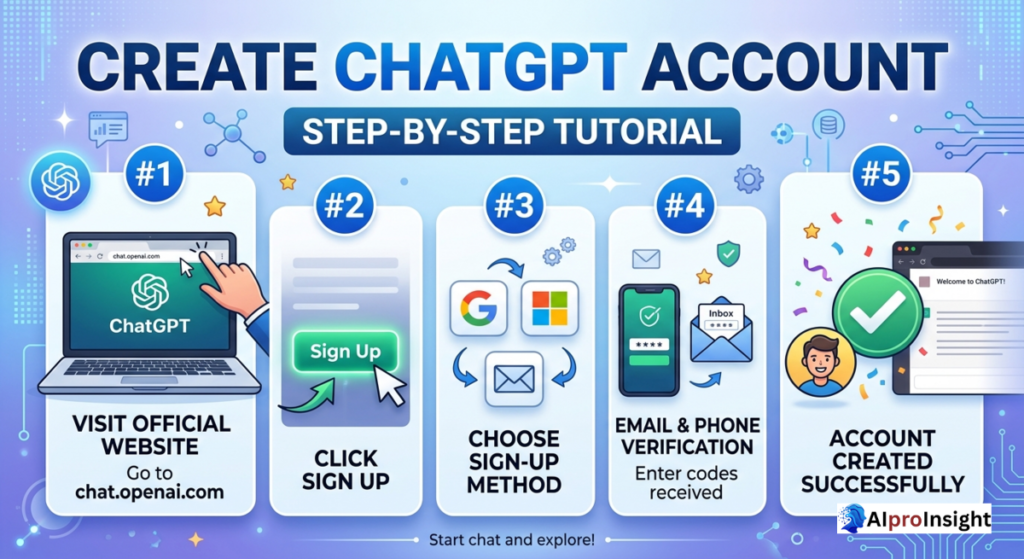
Let’s now go step by step.
Step 1: Visit the Official ChatGPT Website
Open your browser and visit the professional ChatGPT internet site with the aid of OpenAI.
Always make sure you’re on the legitimate website to keep away from faux or rip-off structures.
Step 2: Click on “Sign Up”
On the homepage, you’ll see two options:
- Log in
- Sign up
Click on Sign Up to begin the account advent procedure. This step is the foundation of How to Create ChatGPT Account in 2026 (Step-via-Step Tutorial).
Step 3: Choose Sign-Up Method
You can sign up the use of:
- Email address
- Google account
- Microsoft account
For novices, Google sign-up is the easiest and fastest.
Step 4: Email and Phone Verification
After coming into your email:
- You’ll receive a verification hyperlink
- Click the link to confirm your email
- Enter your cellular number
- Verify the usage of OTP
This protection step guarantees safe get right of entry to while following How to Create ChatGPT Account in 2026 (Step-by-Step Tutorial).
Step 5: Account Created Successfully
Once confirmed, your ChatGPT account is ready.
Congratulations—you’ve completed the center steps of How to Create ChatGPT Account in 2026 (Step-by means of-Step Tutorial).
First Login Experience: What You’ll See
After login, you’ll land on the ChatGPT Dashboard. Don’t fear if it looks new—I’ll explain the entirety.
ChatGPT Dashboard Overview (Beginner Friendly)
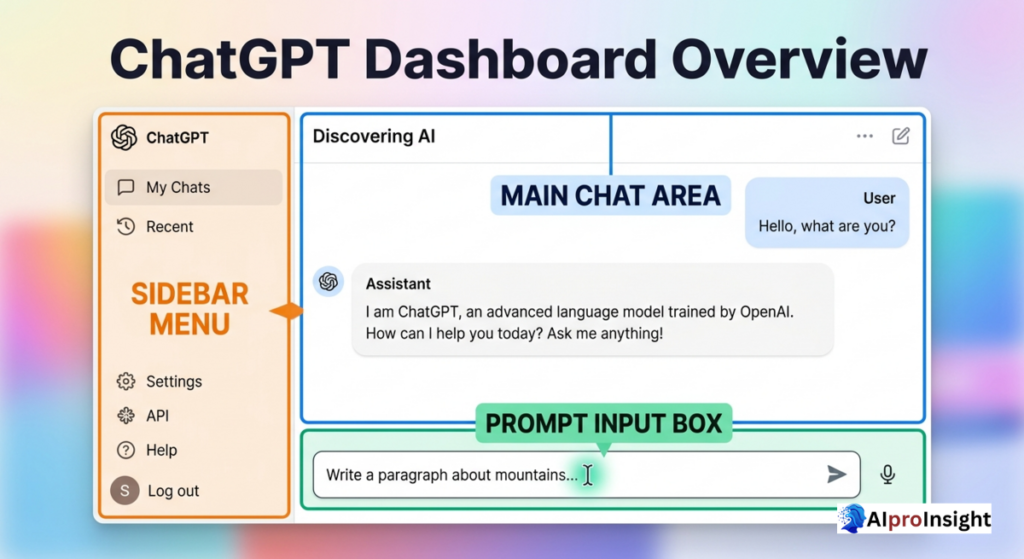
Understanding the dashboard is a key a part of How to Create ChatGPT Account in 2026 (Step-by way of-Step Tutorial).
Main Chat Area
This is where you kind your questions or activates and ChatGPT replies immediately.
Sidebar Menu
On the left side, you’ll see:
- New Chat choice
- Chat records
- Model selection (Free / Paid)
This helps you manage your conversations easily.
Prompt Input Box
At the lowest, you’ll find the textual content box where you kind your questions.
Example:
“Explain ChatGPT in simple words”
ChatGPT Free vs Paid Dashboard Differences
As a part of How to Create ChatGPT Account in 2026 (Step-by way of-Step Tutorial), you have to apprehend versions.
Free Account
- Basic AI version
- Slower responses
- Limited features
- Best for beginners
Paid Account (Plus / Pro)
- Faster responses
- Advanced reasoning
- File and image uploads
- Priority access
You can begin loose and improve each time.
ChatGPT Settings Explained (Very Important)
Settings play a massive function after completing How to Create ChatGPT Account in 2026 (Step-via-Step Tutorial).
Profile Settings
You can:
- Change name
- Update e mail
- Manage account data
Theme and Display
- Light mode
- Dark mode
Choose what feels snug to your eyes.
Privacy and Data Controls
- Control chat history
- Manage statistics utilization
- Improve protection
Always review privacy settings after account creation.
Language Preferences
You can engage in:
- English
- Hindi
- Other supported languages
ChatGPT mechanically adapts.
Common Problems While Creating ChatGPT Account
While following How to Create ChatGPT Account in 2026 (Step-by using-Step Tutorial), some users face troubles:
OTP Not Received
- Check community
- Retry after few minutes
- Use every other number if wanted
Email Verification Failed
- Check spam folder
- Resend verification link
Account Blocked or Restricted
- Avoid VPN for the duration of sign-up
- Use actual information most effective
Safety Tips After Creating Account
Once you complete How to Create ChatGPT Account in 2026 (Step-by means of-Step Tutorial), maintain these suggestions in mind:
- Don’t percentage non-public facts
- Don’t rely blindly on answers
- Verify critical statistics
- Add human contact to AI content material
How to Start Using ChatGPT Like a Pro
After gaining knowledge of How to Create ChatGPT Account in 2026 (Step-by means of-Step Tutorial), novices ought to:
- Ask clean questions
- Give proper context
- Break big tasks into small prompts
- Edit and personalize outputs
Why Day 2 Is Important in ChatGPT Mastery Course
Day 1 helped you apprehend what ChatGPT is.
Day 2 ensures you certainly begin using it.
Without finishing How to Create ChatGPT Account in 2026 (Step-by way of-Step Tutorial), you can not circulate forward in this course.
Future Updates in Account Experience (2026)
OpenAI is that specialize in:
- Better consumer personalization
- Stronger protection
- Simpler onboarding
- Faster dashboard experience
That’s why How to Create ChatGPT Account in 2026 (Step-by way of-Step Tutorial) is greater beginner-pleasant than ever.
Who Should Follow This Tutorial?
This How to Create ChatGPT Account in 2026 (Step-by-Step Tutorial) is perfect for:
- Students
- Bloggers
- Freelancers
- Digital marketers
- Business owners
- Complete beginners
Frequently Asked Questions (FAQ): How to Create ChatGPT Account
1. How do I create a ChatGPT account in 2026?
Visit ChatGPT through the official website, select the sign-up option, and follow the registration instructions. Depending on the available options, you can sign up using an email address or supported authentication methods such as Google, Microsoft, or Apple. After completing the required steps, you can log in and start using your account.
2. Is creating a ChatGPT account free?
Yes. ChatGPT offers a free plan, although the features, models, tools, and usage limits available to free users can change over time. Paid plans provide additional capabilities and higher usage limits.
3. Do I need a phone number to create a ChatGPT account?
No. Phone verification is currently not required to create a new ChatGPT account or use ChatGPT. However, phone verification may be required for certain OpenAI API activities, such as generating an initial API key.
4. Can I use ChatGPT without creating an account?
Yes, ChatGPT can be tried without an account in supported regions. However, logged-out users have limitations, including the inability to save their conversation history. Creating an account provides a more persistent ChatGPT experience and lets you manage saved conversations.
5. Can I create a ChatGPT account with Google?
Yes. The current ChatGPT sign-up experience supports authentication through Google, along with other available options such as Microsoft and Apple. Choosing a supported social login can make account creation and future sign-in more convenient.
6. What can I do after creating a ChatGPT account?
After creating an account, you can use ChatGPT for tasks such as writing, brainstorming, learning, coding, planning, research, and other supported AI workflows. Depending on your plan and available features, you may also be able to use tools for web search, files, images, voice, and data-related tasks.
7. Can I use the same ChatGPT account on my phone and computer?
Yes. You can sign in to the same ChatGPT account across supported devices, including the web and official mobile applications. Your account-based conversations and available features can then be accessed according to your account and plan.
8. Why can’t I create a ChatGPT account?
Sign-up problems can occur because of unsupported locations, authentication issues, temporary service problems, or account-related restrictions. First, check that you’re accessing ChatGPT from a supported country or region and that your sign-in information is correct.
9. Can I create another ChatGPT account?
ChatGPT allows users to have accounts, but account creation and usage remain subject to OpenAI’s current policies and limits. If you’ve previously deleted an account, the same email address can generally be used again after the required waiting period.
10. Is my ChatGPT account secure?
You should protect your account by using a strong authentication method, avoiding sharing login credentials, and reviewing available security settings. ChatGPT also provides account and privacy controls that allow users to manage aspects of their data and account experience.
Final Words
Now you virtually understand How to Create ChatGPT Account in 2026 (Step-by-Step Tutorial).
This became Day 2 of your 15-Day ChatGPT Mastery Course (2026 Edition).
👉 Next, we’ll circulate to Day 3: How to Write Your First Perfect Prompt in ChatGPT — in which real magic begins

Suraj Verma is the Founder of AiProInsight and an AI Automation Researcher specializing in Artificial Intelligence, AI Automation, n8n, SEO, and Digital Marketing. He has published 300+ practical articles covering AI tools, automation workflows, and productivity solutions.
6 thoughts on “How to Create ChatGPT Account in 2026: Step-by-Step Beginner’s Guide”